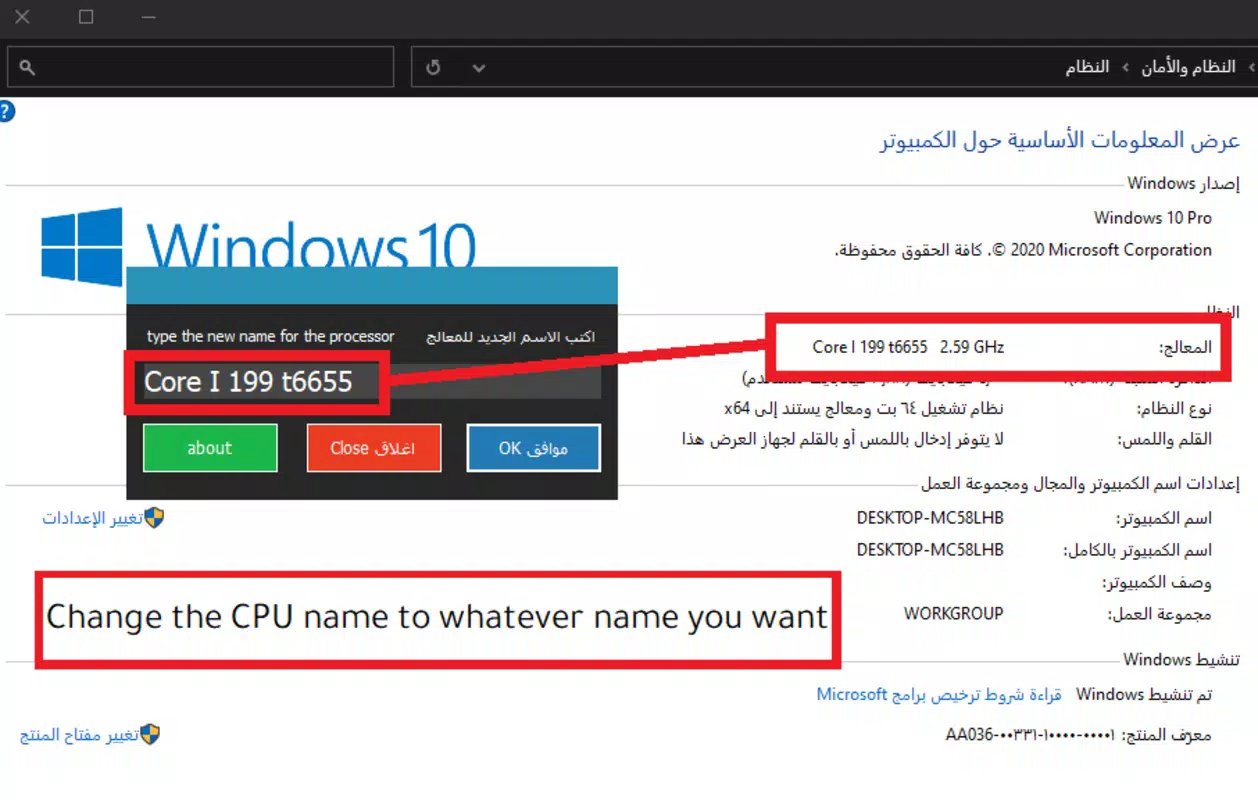

Download CPU Name Changer – CPU info, CPU details, CPU identification, device info
Overview
Designed for users seeking precise control over their device’s system identity, CPU Name Changer offers a focused utility aimed at modifying the CPU’s displayed name within the device’s system information. The app serves as a specialized tool for developers, system testers, and advanced users who require the ability to customize or anonymize CPU identifiers for diagnostic, testing, or privacy-related purposes. While the developer did not provide extensive details about the app’s broader functionality, its core purpose is clearly defined: to allow users to change the CPU name visible in system settings and diagnostic tools.
Target users include those working in mobile development, device diagnostics, or system configuration environments where identifying or masking hardware components is essential. The app may also appeal to privacy-conscious individuals who wish to obscure hardware details from third-party applications or system logs. In the broader app ecosystem, CPU Name Changer fills a niche role as a lightweight, specialized utility within the Tools category, offering a streamlined solution for a specific technical need without unnecessary bloat.
Given its developer, Arnold A. Howe, the app reflects a focused, no-frills approach to system-level customization. Although no additional background on the developer was provided, the app’s minimal footprint and dedicated function suggest a practical, user-centric design philosophy. Real-world use cases include testing software behavior under different CPU identifiers, preparing devices for secure audits, or simulating hardware configurations during development.
Key Features & Functionality
- Custom CPU Name Input – Users can enter a custom name for their device’s CPU, which will be reflected in system-level information displays.
- Immediate System Update – The app applies changes in real time, updating the CPU name without requiring a device restart.
- Safe Configuration Mode – Designed to operate within system constraints, ensuring changes do not interfere with core system stability or hardware functionality.
- Revert to Default Name – Users can restore the original CPU name at any time, allowing for easy recovery if needed.
- Lightweight Design – With a file size of just 2.1 MB, the app consumes minimal storage and runs efficiently on low-end devices.
For developers, this feature set enables controlled testing environments where CPU identification affects software behavior. A system tester might use the app to simulate a device with a different CPU name to evaluate how an application responds to hardware variations. Privacy-focused users could leverage the tool to prevent sensitive hardware details from being exposed in logs or shared diagnostics.
The immediate update function ensures that changes are visible instantly, reducing workflow interruptions. The revert option adds a layer of safety, minimizing the risk of permanent configuration issues. While the app does not provide advanced diagnostics or logging, its focused functionality aligns with its stated purpose: to deliver a reliable, simple method for CPU name modification.
Interface, UX & Performance
The user interface of CPU Name Changer is designed with simplicity and functionality in mind. The layout is minimal, featuring a single input field for the new CPU name, a confirmation button, and a reset option. Navigation is straightforward, requiring only a few taps to complete a change. The visual style is clean and utilitarian, avoiding decorative elements that could distract from the core task.
Despite the lack of detailed performance metrics from the developer, the app’s small file size and focused functionality suggest efficient resource usage. It is likely to perform well on a wide range of Android devices, from entry-level models to high-end smartphones. The app responds quickly to user input, with minimal lag during name changes and updates. Stability appears to be a priority, as the app does not require a reboot to apply changes, indicating a well-integrated system-level function.
Although the developer did not list formal performance metrics, the app’s lightweight nature and immediate update mechanism imply strong responsiveness. The absence of animations or complex transitions further supports smooth operation. Users can expect consistent behavior across different screen sizes and hardware configurations. While no specific information was provided about compatibility with older Android versions, the app’s minimal footprint suggests broad device support. The overall user experience is optimized for speed and reliability, making it suitable for both casual and technical users.
Platform Compatibility & Technical Requirements
CPU Name Changer is available exclusively on the Android platform, designed to operate within the Android ecosystem. The app’s current version is 1.0.0, with a file size of 2.1 MB, indicating a compact and efficient design. This small footprint suggests low system resource demands and fast installation times.
The developer did not specify minimum OS requirements or device compatibility details. As such, it is unclear whether the app supports older Android versions or requires specific hardware permissions. However, given its function as a system-level configuration tool, it likely requires elevated access or root privileges on certain devices. Users should verify compatibility with their specific device model and Android version before installation. The app’s availability on Android suggests it is intended for users with access to advanced system settings, potentially limiting its reach to non-rooted devices.
Pros and Cons
Pros
- Lightweight and fast, with a file size of only 2.1 MB.
- Simple, intuitive interface focused on core functionality.
- Immediate application of changes without requiring a device restart.
- Ability to revert to the original CPU name for safety.
- Free to download and use, with no in-app purchases or ads.
Cons
- Developer did not provide information on required Android OS version.
- Compatibility with non-rooted devices is not confirmed.
- Specific permissions or system access requirements were not disclosed.
- Limited functionality focused on a single task, which may not suit general users.
- No official support or update history provided.
FAQ
Is CPU Name Changer safe to use?
The app is designed to modify only the CPU name displayed in system information. It does not alter hardware or core system functions, reducing the risk of device instability. However, users should ensure they understand the implications of changing system identifiers.
Does the app require root access?
The developer did not specify whether root privileges are required. Some system-level modifications may need elevated permissions, particularly on newer Android versions. Users should check their device’s compatibility before use.
Can I restore the original CPU name after changing it?
Yes, the app includes a built-in option to revert to the default CPU name at any time, allowing users to undo changes safely.
Is CPU Name Changer available for iOS?
Currently, the app is only available for Android devices. There is no official version for iOS platforms.
How often does the app receive updates?
The developer did not provide information about update frequency. Users should monitor the app’s listing for new releases or changes.
Final Thoughts
CPU Name Changer stands out as a precise, no-nonsense utility for users who need to modify their device’s CPU identifier. Its minimalist design, immediate updates, and ability to revert changes make it a reliable tool for developers and advanced users. While its scope is narrow, it excels in delivering on its core promise without unnecessary features or overhead. The app’s free availability and lightweight nature further enhance its appeal.
For those working in mobile development, system testing, or privacy management, CPU Name Changer offers a practical solution to a specific technical challenge. It is not intended for general consumers but serves a valuable niche within the Android tools ecosystem. With its straightforward interface and focus on functionality, it delivers real value to the right audience.
Download CPU Name Changer now


